It has been a while since I published an article on this blog. Running New Yard keeps me busy. But a recent issue with Citrix Workspace Environment Management (WEM) On-Premises is worth sharing. Specifically: what happens when you load balance the WEM Web Console using a Citrix ADC (NetScaler), and why it silently breaks Template-based GPO editing.
TL;DR: Citrix WEM Web Console is not officially supported behind a load balancer. The root cause is that the Data Folder (default: C:\ProgramData\Citrix\WEM\API) is node-local and not shared between WEM servers. Changing this path to a shared UNC path resolves the issue.
Situation: Load Balancing WEM Web Console with NetScaler
In a standard high-availability WEM deployment, organizations run multiple WEM servers (e.g., WEM01 and WEM02) behind a Citrix ADC load balancer. Citrix provides official guidance for load balancing the WEM Agent Broker and Infrastructure Service. However, the WEM Web Console is not mentioned in this documentation:
Citrix Docs: Load Balancing with Citrix ADC
Since the WEM Web Console is a standard web application, I assumed load balancing it would be straightforward. I configured a NetScaler virtual server pointing to both WEM01 and WEM02, used the default WEM Web Console Configuration tool, and deployed it in production. For a while, everything appeared to work normally.
The Problem: Template-Based GPO Errors After Load Balancing
The issue surfaced when I started working with Template-based GPOs in the WEM Web Console. Citrix introduced this feature to manage Group Policy settings directly from within WEM:
Citrix Docs: Template-Based Settings (Actions)
I had already configured a shared Storage Folder on a UNC path and imported ADMX files. After creating several GPO objects and configuring their settings, everything looked correct.
The Error
The next day, when trying to edit one of the GPOs, I received the following error:
Unable to show settings configured in this GPO due to an error. The settings you configured will still function normally. However, if you edit this GPO, those settings will be lost.
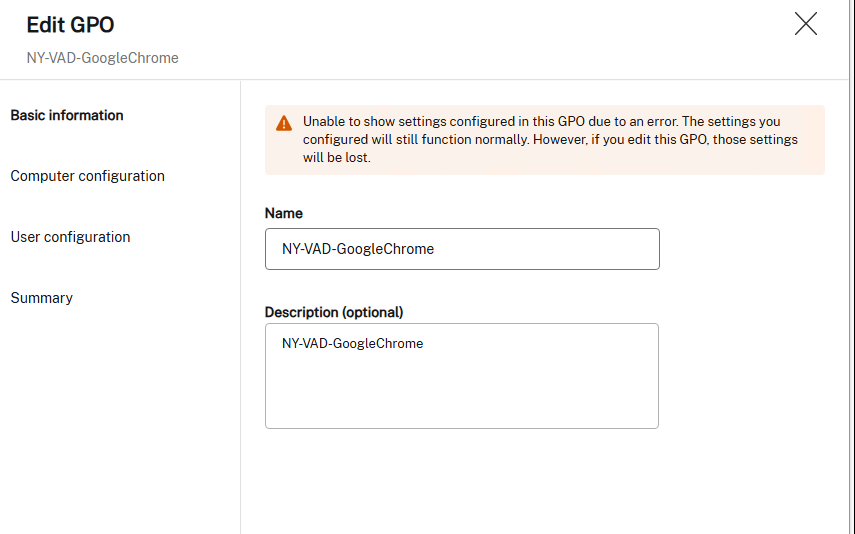
Restarting the Citrix WEM Public API Service on both WEM servers temporarily resolved the error. The next session, it reappeared. This happened several days in a row before I opened a Citrix Support case.
Root Cause: The WEM Data Folder Is Not Shared
After uploading logs and working through the case with Citrix Support, the root cause became clear: the WEM Web Console is not supported in a load-balanced configuration.
During troubleshooting, it was confirmed that connecting directly to WEM01 worked without errors, while connecting directly to WEM02 consistently triggered the issue. The reason:
The WEM Web Console Configuration tool has a Data Folder setting. By default, this is set to C:\ProgramData\Citrix\WEM\API. This is a local path on each individual WEM server. When you edit a Template-based GPO through the load balancer, your session may land on WEM01, but the saved GPO data is written to C:\ProgramData\Citrix\WEM\API on WEM01 only. The next session may route to WEM02, which has no knowledge of that data, hence the error.
Resolution: Point the Data Folder to a Shared UNC Path
The fix is simple once you know where to look. Open the WEM Web Console Configuration tool on each WEM server and change the Data Folder value from the local default path to a shared UNC path, ideally the same share you are already using for the WEM Storage Folder.
- Open the WEM Web Console Configuration tool on WEM01.
- Locate the Data Folder field (default: C:\ProgramData\Citrix\WEM\API).
- Change the value to a UNC path on your existing WEM shared storage (e.g., \fileserver\WEM\API).
- Repeat on WEM02 (and any additional WEM nodes).
- Restart the Citrix WEM Public API Service on all nodes.
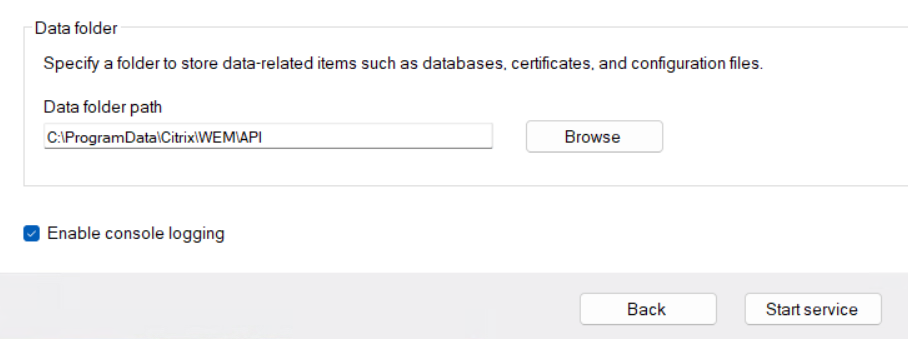
After this change, the Template-based GPO editor worked correctly regardless of which node the load balancer routed the session to.
Why Is This Not Documented?
This is where I find Citrix’s documentation lacking. The official WEM Web Console installation guide does not mention the need to configure a shared Data Folder, nor does it state that load balancing is unsupported:
Citrix Docs: Install the Web Console Service
For a company that actively sells and positions Citrix ADC (NetScaler) as the enterprise load balancer of choice, not documenting this limitation is a significant oversight. Administrators who follow standard HA best practices will walk into this issue with no warning. If Citrix marks the WEM Web Console as unsupported behind a load balancer, that limitation should appear in the documentation. If a shared Data Folder path resolves it, that workaround should be documented as a supported configuration. Neither is currently the case.
Summary
If you are running Citrix WEM On-Premises in a high-availability setup with a load-balanced WEM Web Console and experiencing intermittent GPO template errors, check the following:
- Is the Data Folder in WEM Web Console Configuration set to a local path? If so, it is not shared between nodes.
- Change it to a shared UNC path on your existing WEM storage share.
- Apply the same configuration to all WEM nodes.
- Restart the Citrix WEM Public API Service on all nodes.